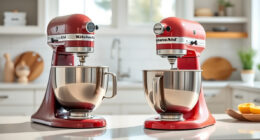
Getting your new KitchenAid Artisan Series 5 Quart Tilt Head Stand Mixer ready for use is straightforward, but following the right setup steps ensures safety and optimal performance. This guide walks you through the necessary preparations, assembly, and initial testing to help you start mixing with confidence.

Get baking supplies delivered free — and shop member deals
- Fast, free delivery on millions of items
- Access to Prime Big Deal Days deals on October 6–7
- Prime Video, Amazon Music and more included
Whether you’re a first-time user or upgrading your kitchen, proper setup is key to enjoying your mixer’s full capabilities. Let’s begin with what you need before starting the setup process.
Key Takeaways
| Ease of setup | Quick and simple steps ensure your mixer is ready in minutes. |
| Safety first | Proper assembly and initial testing prevent accidents and damage. |
| Access to accessories | Learn how to attach and use optional accessories effectively. |
| Maintenance tips | Initial setup includes cleaning and safety checks for long-lasting performance. |
What You Need Before Setting Up
Before beginning the setup process, gather your mixer and any accessories you plan to use. Ensure your workspace is clean, dry, and stable. It’s helpful to have a towel or cloth nearby for wiping down parts and to read the user manual for specific safety instructions.
Check that the power outlet matches the mixer’s specifications and is properly grounded. If you plan to use attachments such as the food grinder or pasta roller, have those attachments ready and clean. Having all tools and accessories at hand will streamline the process and prevent disruptions.
Unboxing and Initial Inspection
- Carefully remove the mixer from its packaging. Place it on a flat, stable surface.
- Inspect all components for any damages incurred during shipping. Confirm that the tilt-head mechanism, mixing bowl, and pouring shield are present and undamaged.
- Read the user manual to familiarize yourself with the parts and safety warnings.
Assembling the Mixer
- Attach the mixing bowl to the base by aligning it with the bowl supports and turning it clockwise until it clicks into place.
- Choose your desired attachment (flat beater, whisk, or dough hook) and insert it into the attachment hub on the tilt-head. Twist it until it locks securely.
- Lift the tilt-head by releasing the latch and tilting it back carefully. Lock it in place once the attachment clicks in.
Attaching and Using Accessories
To use optional accessories like the food grinder or pasta roller, attach them to the power hub at the back of the mixer. Ensure they are securely connected before powering on. For the food grinder, pre-chill the attachment for cleaner grinding results.
Follow the specific instructions for each attachment, such as installing grinding plates or adjusting thickness settings for pasta rollers. Always unplug the mixer before attaching or removing accessories.
Initial Testing and Safety Checks
- Plug in the mixer and turn the speed control to the lowest setting. Turn it on briefly to ensure it runs smoothly and attachments are secure.
- Gradually increase the speed to test different settings, listening for unusual noises or vibrations.
- Stop the mixer, lift the tilt-head, and double-check that all attachments are properly seated and the bowl is locked in place.
If everything functions correctly, your mixer is ready for use. Always refer to the manual for troubleshooting tips if you encounter issues.
The Products in This Guide

KitchenAid Artisan Series 5 Quart Tilt Head Stand Mixer
- ✔ Weight: 26 pounds
- ✔ Warranty: 1 year
- ✔ Color: Multiple options

KitchenAid Stand Mixer Attachment
- ✔ Attachment Type: Food grinder
- ✔ Included Accessories: Plates, stuffer tubes
- ✔ Pre-chill Requirement: Yes
KitchenAid Artisan Series 5 Quart Tilt Head Stand Mixer
<p>The KitchenAid Artisan Series 5 Quart Tilt Head Stand Mixer is built with durable metal construction and offers 59 touchpoints for thorough mixing. Its 5-quart stainless steel bowl handles both small and large batches with ease, making it a versatile choice for any baking enthusiast.</p><p>Easy to access and operate thanks to the tilt-head design, it features 10 speeds suitable for a variety of tasks, from gentle stirring to whipping. The mixer comes in over 20 colors, allowing you to match your kitchen decor perfectly.</p>
Pros:
- Durable metal construction
- Multiple speed settings
- Large 5-quart bowl
- Easy tilt-head access
Cons:
- Requires regular cleaning of attachments
- Heavy to move for some users
- Limited to household use
Best for: Home bakers who want a reliable, multi-purpose stand mixer
Not ideal for: Commercial kitchens or heavy-duty professional use
Bottom line: A durable, stylish mixer perfect for small to medium baking tasks.
KitchenAid Stand Mixer Attachment
<p>The KitchenAid Metal Food Grinder attachment connects seamlessly to your mixer’s power hub, enabling you to grind meats, vegetables, and more with precision. Its included plates and sausage stuffer tubes expand your culinary possibilities.</p><p>Pre-chill the grinder for optimal performance, and use the included storage case for organization. It’s a great addition for those who want to diversify their baking and cooking toolkit.</p>
Pros:
- Versatile grinding options
- Easy to attach and clean
- Includes multiple grinding plates
- Sturdy metal build
Cons:
- Requires pre-chilling for best results
- Additional cost for attachment
- Limited to grinding and stuffing
Best for: Home cooks wanting fresh ingredients and DIY processed foods
Not ideal for: Professional grinding needs or large-scale food processing
Bottom line: A powerful attachment that expands your mixer’s culinary versatility.
Frequently Asked Questions
Can I use attachments other than KitchenAid brand?
It’s recommended to use only KitchenAid-licensed attachments to ensure compatibility and safety.
How do I clean the mixer bowl and attachments?
Most accessories are dishwasher safe; otherwise, wipe with a damp cloth and dry thoroughly. Hand wash the flat beater, wire whip, and dough hook with warm, soapy water.
Is the mixer suitable for large batches?
Yes, the 5-quart bowl can handle up to 9 dozen cookies or 4.5 pounds of dough, making it suitable for small to medium batches.
How do I attach optional accessories like the pasta roller?
Align the attachment with the power hub at the back of the mixer, insert it securely, and lock it in place before use.
What safety precautions should I observe?
Always unplug the mixer before attaching or removing accessories, avoid overloading the mixer, and keep hands and utensils clear of moving parts during operation.
Start Your Baking Journey with Confidence
Setting up your KitchenAid Artisan stand mixer properly ensures safe operation and optimal results. Take your time during assembly, double-check attachments, and familiarize yourself with the controls. With this solid foundation, you’ll be ready to take on any baking project with ease and confidence.
Enjoy experimenting with recipes and optional attachments, knowing your mixer is set up for success from the start.
Affiliate disclosure: As an Amazon Associate we earn from qualifying purchases. Prices and availability are accurate as of the time of publishing.
Fall Picks
fall essentials
As an affiliate, we earn on qualifying purchases.